遊戲操作區
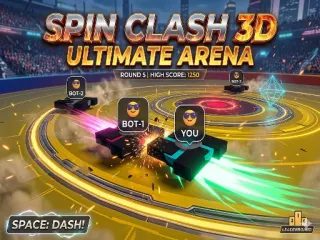
遊戲介紹
進入 Spil Clash 3D 終極競技場,展開一場節奏緊湊的 3D 陀螺大亂鬥!你可以選擇單人模式,挑戰 10 個關卡的 AI 對手,也能和朋友在本機 1v1 多人模式中一較高下。你的目標就是撐到最後,把對手全部撞出競技場邊緣!遊戲特色:每關最多進行 5 回合,競技場會從「巨型」一路動態縮小到「中型」。抓取強化道具即可啟動泰坦模式,體型與質量大幅提升,輕鬆壓制敵人。連續攻擊對手可累積連擊倍率,衝出高分。善用衝刺能力,使出威力十足的猛撞攻擊。
Enter the arena in spil clash 3D Ultimate Arena an action-packed 3D spinning top battle game! Choose between Single Player mode to fight AI bots across 10 levels, or challenge a friend in local 1v1 Multiplayer. Your objective is to survive by knocking your opponents off the edge of the arena. Features:Battle through up to 5 rounds per level as the arena size dynamically shrinks from Colossal to Medium. Grab powerups to activate Titan Mode, drastically increasing your size and mass to overpower enemies. Chain attacks against opponents to build your combo multiplier and achieve a high score. Utilize your dash ability for a powerful ramming
遊戲說明
官方遊戲說明
PC Controls - Player 1 Blue W A S D Move around the arena Spacebar Dash attack PC Controls - Player 2 Red Multiplayer Only Arrow Keys Move around the arena Shift Dash attack Mobile Touch Controls Movement Use the on-screen jo
操作方式
橫向畫面,建議以滑鼠或觸控板操作,點擊遊戲區域即可開始。
遊戲玩法
詳細玩法請參考上方「遊戲介紹」文字說明與遊戲畫面中的教學提示。
小提醒
可全螢幕遊玩;若畫面無法載入,請點「重新載入」重啟。


