遊戲操作區
遊戲介紹
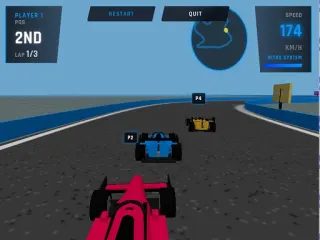
準備好迎接極速快感了嗎?《3D 方程式賽車:專業版》是一款節奏飛快的 3D 街機競速遊戲,專為熱愛腎上腺素的玩家打造!坐上高性能方程式賽車的駕駛座,在 20 個充滿挑戰的關卡中馳騁,從霓虹閃爍的賽博龐克城市,到黃沙滾滾的沙漠峽谷,甚至連火星地表都能飙風。遊戲內建聰明的漸進式難度系統——隨著你不斷過關,AI 對手會跑得更快、攻擊性更強,把你的駕駛技術逼到極限。學會在急彎中甩尾飄移,並猛按氮氣(NOS)加速鍵,把對手狠狠甩在後頭!
Get ready for the ultimate speed rush in 3D Formula Racing: Pro Edition, a fast-paced 3D arcade racing game designed for true adrenaline junkies! Step into the cockpit of a high-performance formula car and race across 20 challenging stages, from neon-lit cyberpunk cities to dusty desert canyons and Martian landscapes. The game features an intelligent progressive difficulty system—as you conquer levels, the AI rival bots become faster and much more aggressive, pushing your driving skills to the absolute limit. Master the art of drifting around sharp corners and smash the Nitro (NOS) button to leave your opponents in the dust! hnks for game mo
遊戲說明
官方遊戲說明
Game Controls For PC Keyboard Player 1 W A S D - Accelerate Steer Left Right and Brake Left Shift - Nitro NOS Boost Player 2 Split-Screen Mode Arrow Keys - Accelerate Steer Left Right and Brake Enter - Nitro NOS Boost For Mobile Touch S
操作方式
橫向畫面,建議以滑鼠或觸控板操作,點擊遊戲區域即可開始。
遊戲玩法
詳細玩法請參考上方「遊戲介紹」文字說明與遊戲畫面中的教學提示。
小提醒
可全螢幕遊玩;若畫面無法載入,請點「重新載入」重啟。


